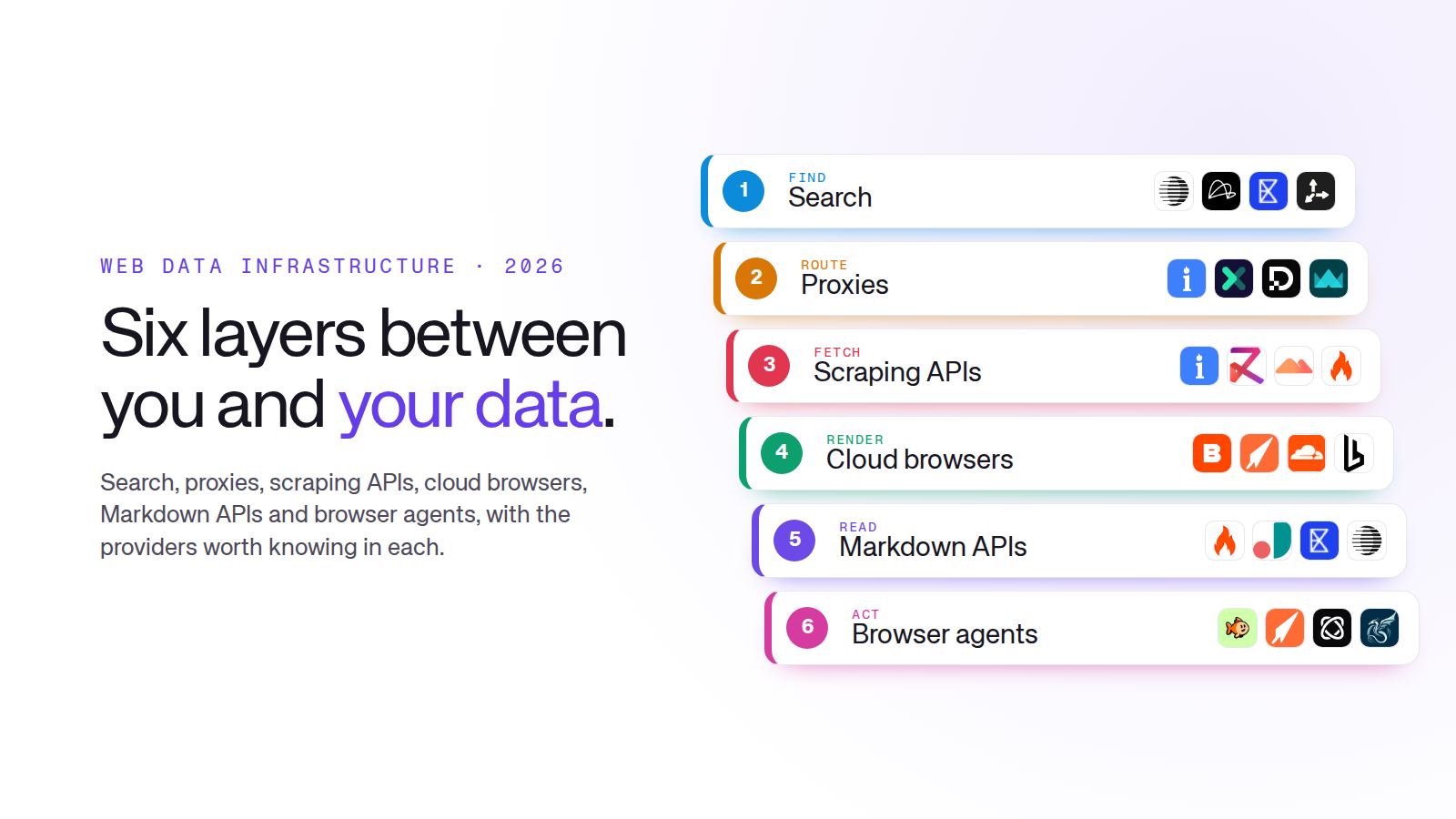
What infrastructure do you need to extract web data? Usually a few layers, not one tool. A search API finds the pages. Proxies route the requests. A web scraping API or unblocker fetches pages without getting blocked. A cloud browser renders pages that need JavaScript or a login. A Markdown API turns pages into clean text for a language model. An AI browser agent handles the multi-step jobs a script can’t.
Each layer does one job well. Put five or six of them together, though, and someone has to hold the stack up: wire the providers together, schedule the runs, check the rows and fix it all when a site changes. That someone is usually you.
This guide covers each layer, what it solves, what it leaves to you and the providers worth knowing in each. If you’d rather not hold the stack up at all, the last section covers that too.
Last updated 19 November 2026.
The layers at a glance
| Layer | What it solves | Providers to know |
|---|---|---|
| Web search APIs | Finding the right pages to read | Parallel, Linkup, Exa, Tavily, Brave Search API, SerpApi |
| Proxies | Spreading requests across IPs and countries | Bright Data, Oxylabs, Decodo, IPRoyal, Proxy-Seller, Massive, Webshare |
| Web scraping APIs and unblockers | Fetching pages without blocks, CAPTCHAs or retries to manage | Bright Data, Zyte API, Massive, Firecrawl, ScrapingBee, ScraperAPI, Oxylabs, ZenRows |
| Cloud and headless browsers | Rendering JavaScript, keeping sessions and logins | Browserbase, bro, Cloudflare Browser Run, Browserless, Steel, Hyperbrowser, Lightpanda |
| URL to Markdown APIs | Turning pages into clean text or JSON for language models | Firecrawl, Jina Reader, Exa, Parallel, Zyte API |
| AI browser agents | Multi-step jobs: logins, clicks, forms | TinyFish, bro, Browser Use, Skyvern |
Web search APIs for AI agents
Before you can extract a page, you have to find it. A web search API returns search results, and often page content, for a query. AI agents call it first, then read the pages it returns.
 Parallel Web search, extraction and monitoring built for AI agents.
 Linkup A web search API for AI, aimed at grounding answers in current sources.
 Exa Search built for language models, with its own index and page contents.
 Tavily A search API for agents that returns ranked results with page content.
 Brave Search API Results from Brave's own independent index.
 SerpApi Google and other search engine results as JSON. See our SerpApi alternatives.
Reach for a search API when you don’t know the URLs in advance, or when an agent needs fresh sources for a question. It hands you a list of links. Deciding which are worth fetching, and passing them on, is your code.
Proxies for web scraping
A proxy sends your request from a different IP address, so one site doesn’t see thousands of requests from one machine. The main types are residential (home connections, hardest to block), ISP (static residential IPs), datacenter (fast and cheap, easiest to block) and mobile (4G and 5G connections). Most teams mix them: datacenter for easy sites, residential for hard ones.
| Provider | Stands out for | Good fit |
|---|---|---|
 Bright Data | Targeting by country, city, ZIP code and carrier | Large, steady volumes |
 Oxylabs | Large residential and datacenter pools | Enterprise data teams |
 Decodo | All four proxy types, formerly Smartproxy | Self-serve teams |
 IPRoyal | Residential traffic that doesn't expire | Pay-as-you-go projects |
 Proxy-Seller | IPv4 and IPv6 datacenter, rotating mobile | Cheap dedicated IPs |
 Massive | Residential IPs from a volunteer device network | Teams who also want a web access API |
 Webshare | Free plan, low-cost datacenter IPs | Getting started |
You only need your own proxies if you run your own fetching code; scraping APIs include them. If you do, the retries, blocks, CAPTCHAs and the bandwidth bill are yours to manage.
Web scraping APIs and unblockers
A web scraping API takes a URL and returns the page. Behind that one call, it picks a proxy, avoids blocks, retries failures and renders JavaScript when needed. An unblocker is the same idea, focused on getting past anti-bot systems.
Web Unlocker and a Web Scraper API on top of one of the largest proxy networks.
Bright Data alternatives →Ban handling, browser rendering, sessions and automatic extraction in one API, from the team behind Scrapy.
A web access API backed by millions of volunteer devices in more than 195 countries.
Scrape and crawl APIs that return Markdown or JSON, popular with developers building on language models.
Firecrawl alternatives →
A simple API that handles headless browsers and rotating proxies for you.
ScrapingBee alternatives →
Proxies, rendering and retries behind one endpoint.
A Web Scraper API alongside large residential and datacenter proxy pools.

A universal scraper API with anti-bot bypass and JavaScript rendering.
Most teams start here, because one call replaces the hardest part of fetching. What comes back is still a raw page, though. Turning it into the fields you need, and noticing when a site redesign quietly breaks your parser, stays on your side.
Cloud browsers and headless browsers for AI agents
Some pages only show their data after JavaScript runs, a button is clicked or a user logs in. A headless browser is a real browser without a screen, controlled by code. A cloud browser runs it for you, at scale, with sessions, stealth settings and proxies handled. It’s now the default way to give an AI agent access to the web.
Hosted cloud browsersYou call an API and they run the browsers
 Browserbase Cloud browsers built for AI agents, with session recording and the Stagehand framework.
 bro A stealth browser API for agents, workflows and data pipelines. Drive it with direct commands, or let its AI commands navigate and extract.
 Cloudflare Browser Run Headless Chrome on Cloudflare's network, controlled from Workers. Formerly Browser Rendering.
 Hyperbrowser Cloud browsers for agents, with built-in stealth and CAPTCHA handling.
Open sourceRun it yourself, or use their cloud
 Browserless Hosted Playwright and Puppeteer, with an open-source version you can run yourself.
 Steel An open-source browser API for AI agents, also offered as a cloud service.
 Lightpanda An open-source headless browser built from scratch for AI and automation, much lighter than Chrome.
Use a cloud browser when the data sits behind JavaScript, logins or clicks, or when an agent needs a browser of its own. The provider runs the browsers; the script that drives them, the logins it keeps alive and the selectors that break when a page changes are yours.
URL to Markdown APIs for LLMs
Language models work best with clean text, not raw HTML full of menus, scripts and ads. A URL to Markdown API fetches a page and returns just the content, as Markdown or structured JSON.
What the page sends menus, scripts, markup
<nav class="mega-menu"><ul><li><a href="/…
<div id="__state" data-cart='{"items":…
<div class="cookie-banner">We value…
<div class="pdp__title-wrap"><h1 class=
 "pdp__title">Trail Runner 3</h1>
<span class="price price--sale">€89</sp…
<footer><div class="newsletter">…What the API returns just the content
# Trail Runner 3

**€89** ~~€119~~ · In stock

Lightweight trail shoe with a
4 mm drop and a Vibram sole.

## Sizes
38, 39, 40, 41, 42, 43
 Firecrawl Returns pages as Markdown or JSON, and can crawl a whole site in one job.
 Jina Reader Put
r.jina.ai/in front of any URL to get the page back as Markdown.- Exa A contents endpoint that returns clean text for the pages its search finds.
- Parallel An extract API that pulls the parts of a page that answer your objective.
 Zyte API Automatic extraction that returns products, articles and other page types as structured fields.
This layer pays off when a language model is the reader: fewer tokens, less noise. You still have to map the clean text to your own columns and check the model didn’t miss or invent a value.
AI browser agents
A browser agent is a language model driving a browser. You give it a goal, such as “log in, open the orders page and export last week’s orders”, and it plans the clicks, typing and navigation itself. It’s slower and costs more per page than a script, but it handles jobs that would otherwise take a lot of custom code.
An AI browser agent for jobs that need logins, clicks and forms, on the same platform as its search, fetch and browser APIs.
AI commands that act on a page and extract structured data, on top of its stealth browser API.

An open-source library for building browser agents, with a cloud version.

Open-source browser automation that uses language models and vision to work through forms and workflows.
Agents earn their cost on jobs with many steps, a login or a few decisions along the way. For the same job every day, a script is cheaper, and someone still has to check that the agent clicked the right thing.
How the layers fit together
A typical data extraction pipeline uses three or four of these layers at once, often from as many vendors. Each one hands its output to the next, and every hand-off is code that you write and keep working:
One request, six vendors, built yourself

- 1Turn search results into a fetch queue, without duplicates
- 2Rotate proxies, retry the blocked ones, watch the bill
- 3Spot which pages came back empty and need a real browser
- 4Keep sessions and logins alive between runs
- 5Map clean text to your columns, and check it
- +Schedule it, store it, alert on it, fix it when a site changes
Each provider does its own part well. Holding the whole thing together is the part nobody sells, and it’s usually most of the cost.
One pipeline instead of six layers
Building on these layers gives you full control. For an engineering team with a steady, well-defined job, it can be the right call. Before you start, add up every line: each provider bills its own unit, and the time spent repairing pipelines adds up faster than the API bills. Our page on what a web data pipeline costs to run yourself puts it all on one bill.
If what you need is the data, not the stack, Jsonify runs the whole thing for you. You describe the dataset and how often you need it. Jason, our AI agent, finds the sources, picks the right layers for each site, checks every run and repairs the pipeline when a source changes. The rows arrive in Google Sheets, Snowflake, a webhook or an API.
The same six layers, as one pipeline
 Jason builds
and repairs it
 one bill, one pipeline

 API
You: doing literally anything else.
Describe the data you need →To compare Jsonify with tools at every level, from APIs to no-code apps, read the best data extraction tools in 2026, by job, or browse all our side-by-side comparisons.
Frequently asked questions
What infrastructure do I need to extract web data at scale? At minimum, a way to fetch pages without being blocked (a web scraping API, or your own code with proxies), a browser for pages that need JavaScript, and somewhere to store and check the results. Add a search API if you don’t know the URLs in advance, and a Markdown API if a language model reads the pages.
Do I need proxies if I use a web scraping API? Usually not. Web scraping APIs and unblockers include proxies and rotate them for you. You need your own proxies when you run your own fetching code or your own browsers.
What’s the difference between a cloud browser and a browser agent? A cloud browser is the browser: your code tells it exactly what to click. A browser agent is a language model that decides what to click to reach a goal. Many agents run on top of cloud browsers.
Which proxies are best for web scraping? Residential proxies are the hardest to block and suit difficult sites. Datacenter proxies are faster and cheaper and work for most simple sites. Bright Data, Oxylabs and Decodo cover every type, and IPRoyal, Proxy-Seller and Webshare are popular lower-cost options.
What’s the best way to give an AI agent access to web data? Give it a search API to find pages, a Markdown API to read them, and a cloud browser for pages that need interaction. If the agent needs the same data every day or week, a maintained dataset is more reliable than having the agent collect it each time.
Should I build my own web data pipeline or buy one? Build when you have engineers, a steady job and time to maintain it. Buy when the data matters more than the pipeline, when you need many sources, or when nobody wants to fix it every time a site changes.