
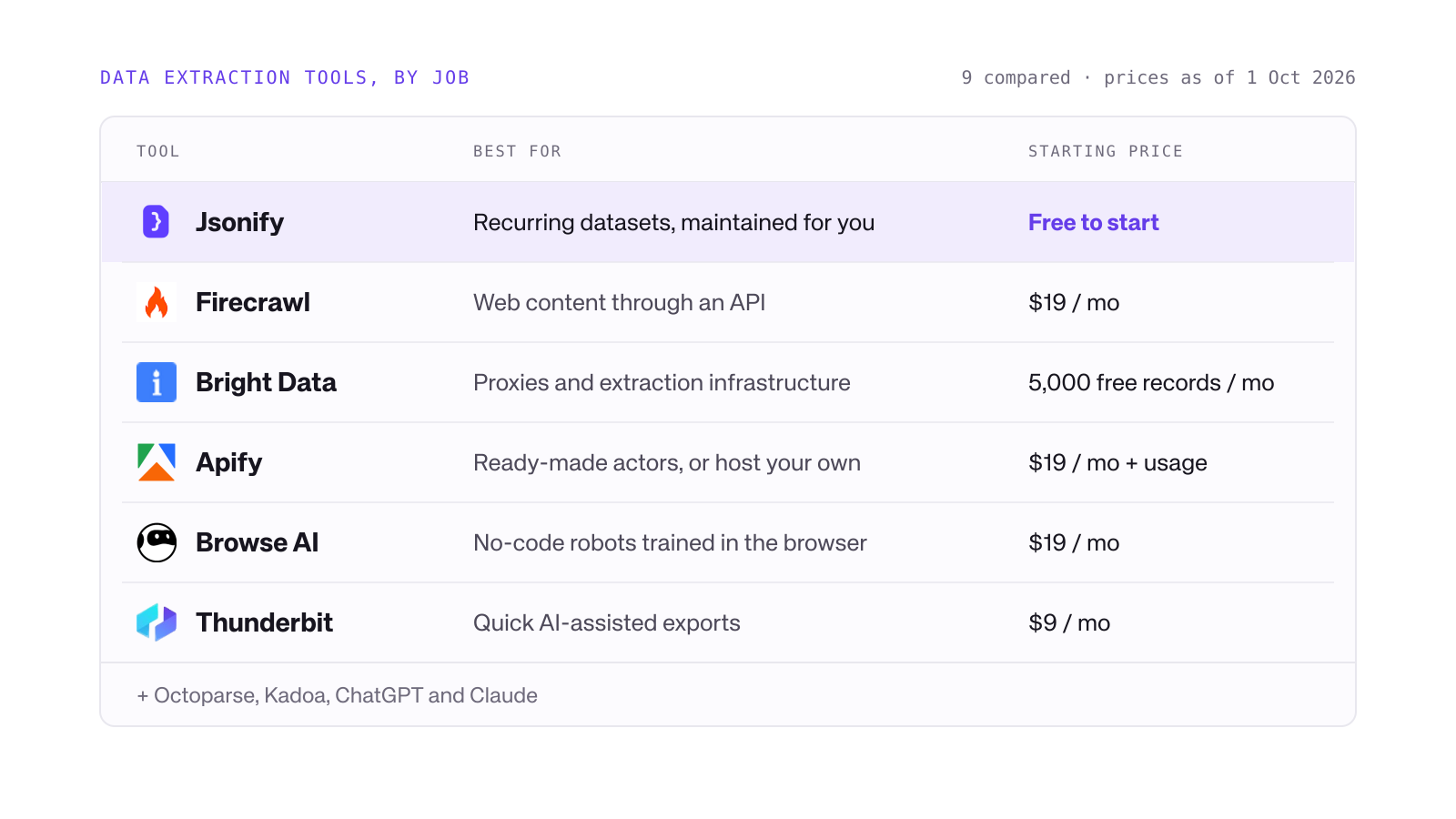
What is the best tool for scraping? There isn’t one best tool. There is a best tool for each job. If you are a developer who wants page content through an API, use Firecrawl. If you want proxies and unblocking at scale, use Bright Data. If you want ready-made scrapers or want to host your own, use Apify. If you want a no-code tool you click through yourself, use Browse AI, Octoparse or Thunderbit. If you want a recurring dataset delivered and kept working without building anything, use Jsonify.
The rest of this guide explains how to choose, and compares thirteen tools side by side. Prices are starting prices taken from each vendor’s pricing page.
Updated 11 November 2026: Outscraper and ScrapingBee added. On 10 November: prices rechecked, a best pick for each use case, ParseHub and Web Scraper added, and more questions answered.
The best data extraction tool for each use case
If you already know what you need, start here. Each pick is explained further down.
| If you need… | Best pick | Also consider |
|---|---|---|
| Page content through an API, as a developer | Firecrawl | ScrapingBee |
| Proxies and unblocking at large scale | Bright Data | Apify |
| Ready-made scrapers, or a place to host your own | Apify | Firecrawl |
| Search engine results as JSON | SerpApi | Serper |
| Google Maps business lists in bulk | Outscraper | Apify |
| A no-code tool you train in the browser | Browse AI | Thunderbit |
| Point-and-click extraction from interactive sites | Octoparse | ParseHub |
| A free tool for occasional exports | Web Scraper (Chrome extension) | Thunderbit |
| A quick AI-assisted export from a few pages | Thunderbit | ChatGPT or Claude |
| The same dataset every week, from many sites, kept working for you | Jsonify | Kadoa |
The best scraping tool for a beginner is usually a no-code one: Browse AI, Thunderbit or the free Web Scraper extension. The best tool for scraping at scale is the one whose pricing fits your volume, which for most engineering teams means Bright Data or Apify.
Start with the job, not the tool
Most data extraction tools fall into one of four groups. Choosing the group first narrows the choice to two or three names.
- APIs and infrastructure for developers. You write the code. The tool fetches pages, handles proxies and blocking, and returns HTML, Markdown or JSON. Firecrawl, Bright Data and ScrapingBee sit here, and so do search results APIs such as SerpApi, which return what Google or another engine shows for a query. Each bills its own unit, so add them up before you compare: what a web data pipeline costs to run yourself puts every line on one bill.
- Platforms for running scrapers. You pick a ready-made scraper from a marketplace or deploy your own, and the platform runs and schedules it. Apify is the main example; Outscraper sells ready-made scrapers for Google Maps and other set sources, paid per result.
- No-code tools you operate yourself. You point and click in a browser or a desktop app to teach the tool what to collect. Browse AI, Octoparse, ParseHub, Web Scraper and Thunderbit sit here.
- Managed datasets. You describe the data you need and how often, and someone else builds and maintains the collection. Jsonify and Kadoa sit here.
General-purpose assistants like ChatGPT and Claude can also pull data from a few pages during a chat. They are useful for one-off research, but they don’t run on a schedule or keep a dataset up to date.
Thirteen data extraction tools compared
| Tool | Best for | How it works | Starting price |
|---|---|---|---|
| Jsonify | Recurring datasets across many sites | You describe the dataset; Jason, our AI agent, builds and repairs the pipeline | Free to start |
| Firecrawl | Developers who want web content through an API | Scrape, crawl and monitor APIs, billed in credits | $19 a month (Hobby) |
| Bright Data | Engineers who want extraction infrastructure | Proxies, unlocker and scraper APIs, priced per request or record | 5,000 free records a month (Web Scraper API) |
| Outscraper | One-off bulk exports of Google Maps businesses | Pay-per-result scrapers for Google Maps and other set sources | 500 free, then $3 per 1,000 businesses |
| ScrapingBee | Developers who need pages fetched past blocking | Scraping API with headless browsers and proxies, billed in credits | $19 a month (Hobby) |
| Apify | Running or writing your own scrapers | Actor marketplace and hosting platform, plan plus usage | $19 a month plus usage (Starter) |
| Browse AI | No-code robots you train in the browser | Robots trained by demonstration, on credit plans | $19 a month, billed annually |
| Octoparse | Hands-on control of visual extraction tasks | Visual task builder with local or cloud runs | $69 a month (Standard), billed annually |
| ParseHub | Click-to-select extraction from interactive sites | Desktop app where you click the data; runs on ParseHub’s servers | Free plan; $189 a month (Standard) |
| Web Scraper | Free point-and-click extraction in Chrome | Chrome extension for local runs, plus a paid cloud for schedules | Free extension; $50 a month (Cloud), billed annually |
| Thunderbit | Quick AI-assisted exports from pages | Browser extension and web app, on credit plans | $9 a month (Starter), billed yearly |
| Kadoa | Finance teams evaluating maintained data | AI monitors, pipelines and datasets, quoted on usage | Quote, consumption-based |
| ChatGPT and Claude | One-off research and analysis | General-purpose assistants, on seat plans | $20 a month (ChatGPT Plus, Claude Pro) |
Prices checked on each vendor’s pricing page on 10 November 2026 (Outscraper and ScrapingBee on 11 November). Each linked name opens a full comparison with the other tools in its group, including what a typical job costs on each. ParseHub and Web Scraper are covered on the Octoparse alternatives page.
How to choose
Do you want to write code? If yes, start with Firecrawl for page content or Bright Data for infrastructure at scale. If you’d rather not host anything, Apify runs the code for you.
Is it a one-off or recurring? A one-off export from a few pages is fine in Thunderbit, Browse AI, the Web Scraper extension or even ChatGPT. Recurring data is where the work is: sites change, pages break and rows go missing. Before you pick a tool, decide who fixes the collection when a site changes. With the self-serve tools, that’s you.
How many sites? One or two sites suit a no-code tool. Dozens of sites, each with its own layout, multiply the setup and repair work. That is the case managed datasets are built for.
What do you need at the end? A spreadsheet export, an API, a database table, or rows in a Google Sheet every Monday all point to different tools. Check the delivery options before the extraction features.
What will it cost at your volume? Starting prices hide the real cost. Credits, records and requests are counted differently, so price the same job on two or three tools. Our comparison pages do this for a sample job.
Where Jsonify fits
Jsonify is for teams that need the same data again and again, from many sources, and don’t want to build or maintain the collection. You tell Jason what data you need and how often. He works out where it lives, builds the pipeline, verifies the rows and repairs the pipeline when a source changes. The data arrives where you work, for example Google Sheets, a webhook or Snowflake.
To see what Jason has built recently, read the November product update.
If you’d rather control every step yourself, one of the other tools above will suit you better, and the comparison pages say which.
Describe the data you need and see what Jason builds.
Frequently asked questions
What is the best tool for scraping? It depends on the job. Firecrawl suits developers who want page content through an API, Bright Data suits large-scale extraction with proxies, Apify suits running your own scrapers, and Browse AI, Octoparse and Thunderbit suit people who don’t code. For a recurring dataset that someone else keeps working, use Jsonify.
What is the best free tool for data extraction? Several tools have free tiers. The Web Scraper Chrome extension is free for unlimited local runs, Bright Data’s Web Scraper API includes 5,000 free records a month, and Jsonify is free for 100 rows a month. Free tiers suit testing; check the limits before you rely on one for recurring work.
What is the best tool for scraping without code? Browse AI, Octoparse, ParseHub, Web Scraper and Thunderbit are built for people who don’t code: you show the tool what to collect. Jsonify needs no code either, but you describe the data instead of clicking through pages.
What is the best AI tool for data extraction? Thunderbit offers AI-assisted extraction in a browser extension, web app and API, Firecrawl returns web pages as Markdown or JSON for developers building on language models, and Jsonify’s AI agent, Jason, builds and repairs the whole pipeline from a description. ChatGPT and Claude work for a few pages in a chat.
Which tool is best for scheduled, recurring data? Apify, Octoparse, Thunderbit and Firecrawl can all run jobs on a schedule, but you still fix the job when a site changes. Jsonify runs on your schedule and Jason checks every run and repairs the pipeline when a source changes.
Can ChatGPT or Claude replace a data extraction tool? For a handful of pages, often yes. For thousands of rows on a schedule, no: they don’t run unattended, and the output can change from one run to the next.
Is web data extraction legal? Collecting publicly available data is common practice, but the rules depend on the site’s terms, the type of data (personal data has stricter rules) and where you operate. Check with your legal team for your use case.